


Unstable Wi-Fi should never decide whether you study. The PracticeVCE app and Windows engine for the TDA-C01日本語 exam support offline practice anytime — rehearse the Tableau Certified Data Analyst (TDA-C01日本語版) through 2026 on planes, trains, and lunch breaks, unaffected by the state of any network.
Tableau TDA-C01日本語 Exam Overview:
| Certification Vendor: | Tableau (Salesforce) |
|---|---|
| Exam Name: | Salesforce Certified Tableau Data Analyst |
| Exam Number: | TDA-C01 |
| Passing Score: | 65% |
| Exam Duration: | 105 minutes |
| Real Exam Qty: | 65 |
| Available Languages: | Japanese, English, Simplified Chinese |
| Exam Price: | 250 |
| Related Certifications: | Tableau Desktop Specialist Salesforce Certified Tableau Server Certified Associate |
| Exam Format: | Multiple-choice, Multiple-select |
| Certificate Validity Period: | 2 years (Maintenance required) |
| Sample Questions: | DOWNLOAD DEMO |
| Exam Way: | On-site (Pearson VUE) or Online Proctored |
| Pre Condition: | None recommended, though practical experience is advised |
| Official Syllabus URL: | https://trailhead.salesforce.com/en/credentials/tableaudataanalyst |
Tableau TDA-C01日本語 Exam Syllabus Topics:
| Section | Weight | Objectives |
|---|---|---|
| Connect to and Transform Data | 24% | - Connect to data sources
|
| Explore and Analyze Data | 41% | - Create table calculations
|
| Publish and Manage Content on Tableau Server and Tableau Online | 9% | - Publish content
|
| Create Content | 26% | - Create and modify stories
|
What Candidates Ask About the Tableau Certified Data Analyst (TDA-C01日本語版)
The passing mark for the TDA-C01日本語 exam is 65%, and the official registration fee is 250. One practical note: the fee buys a single attempt — a retake is charged in full again. Protect that spend by rehearsing first: drill 178 practice questions at PracticeVCE under timed conditions until your scores clear the passing mark with margin, then book.
The TDA-C01日本語 exam — officially the Tableau Certified Data Analyst (TDA-C01日本語版) — is Tableau's certification test for professionals working with its technologies, and passing it earns the Tableau Certified certification at the Advanced level. Because it is vendor-issued and skills-based, employers can compare candidates on it directly — that is what keeps it valuable. It also connects naturally to Tableau Desktop Specialist, Salesforce Certified Tableau Server Certified Associate.
Yes — PracticeVCE publishes a free PDF demo of the TDA-C01日本語 practice questions, printable if you prefer paper, so you can evaluate the content and verified answers before paying anything. Once you purchase, 365 days of free updates are included, and if the product expires, the update service renews at a 50% discount from your member zone.
The Tableau Certified Data Analyst (TDA-C01日本語版) syllabus spans 4 domains, led by Publish and Manage Content on Tableau Server and Tableau Online (9%), Create Content (26%), and Connect to and Transform Data (24%). The complete weighted outline is in the syllabus section above — it is the map your preparation should follow.
None recommended, though practical experience is advised
Vendor criteria do change, so before scheduling, verify the latest requirements on the official Tableau exam page.
Delivery first: download immediately after payment, with an email copy arriving within one minute. If 2 hours pass with no email, check spam and contact our support team. There is no limit on how many computers you can install the software on.
If you take the TDA-C01日本語 exam within 60 days of purchase and do not pass, the PracticeVCE money back guarantee applies: file within 2 days of the exam with a scanned enrollment slip and the official score report (PDF), and the claim is processed within 7 days. The candidate name must match the payer name; the policy excludes exams taken within 3 days of purchase, purchases never used in an actual exam attempt, free materials, and expired orders. If you would rather keep preparing, exchange the product for two free exam packages of equal value and keep the update service on your original purchase.
You will face 65 questions within 105 minutes on the TDA-C01日本語 exam. That ratio makes time management a scored skill, and it is best trained offline where you cannot be distracted: run timed mocks in the PracticeVCE Windows engine or app, and let the pacing rhythm settle in before exam day.
Tableau Certified Data Analyst (TDA-C01日本語版) Sample Questions:
デスクトップにある Book1 へのリンクを開きます。規律ワークシートを開きます。
テーブルをフィルターして、Top10 セットのメンバーと Bottom10 セットのメンバーを表示します。合計 20 行になるはずです。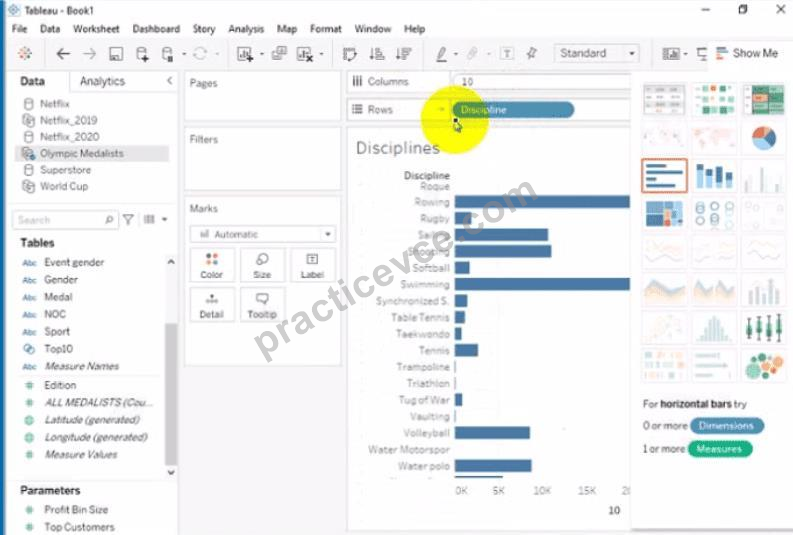
Correct Answer:
check the steps below in explanation.
Explanation:
To filter the table to show the members of the Top10 set and the Bottom10 set, you need to do the following steps:
* Open the link to Book1 found on the desktop. This will open the Tableau workbook that contains the Disciplines worksheet.
* Click on the Disciplines tab at the bottom of the workbook to open the worksheet. You will see a table that shows the disciplines, sales, and profit for each salesperson.
* Click on the drop-down arrow next to Salesperson on the Filters shelf. This will open a menu that allows you to filter by different criteria.
* Select Set from the menu. This will show you the sets that are available for the Salesperson field. You will see Top10 and Bottom10 as two sets that have been created based on the sales ranking.
* Check the boxes next to Top10 and Bottom10. This will filter the table to show only the members of these two sets. You can also click on All to deselect all other values.
* Click OK to apply the filter. You will see that the table now shows 20 rows, 10 for each set.
References: https://help.tableau.com/current/pro/desktop/en-us/sets.htm https://help.tableau.com/current/pro/desktop/en-us/filtering.htm
Tableau で表示/非表示ボタンを使用するときに、オブジェクトがタイル レイアウト コンテナー内にある場合はどうなりますか?
- A. 非表示のオブジェクトは同じ位置に残りますが、グレー表示されます。
- B. オブジェクトはアイテム階層から消えます。
- C. スペースを埋めるためにレイアウトが自動的に調整されます。
- D. オブジェクトはダッシュボードから削除されます。
Correct Answer: C 🗳️
次のデータセットがあります。
すべての地域の総計を計算するには、どの詳細レベル (LOD) 式を使用する必要がありますか?
- A. {固定: 合計 (売上)}
- B. {修正: [地域] 売上合計}
- C. {修正: 売上合計}
- D. {固定: [地域]: 総売上}
Correct Answer: C 🗳️
Explanation: Only visible for PracticeVCE members. You can sign-up / login (it's free).
データアナリストは、米国のすべての都市のデータが入ったデータソースを持っています。以下はそのデータのサンプルです。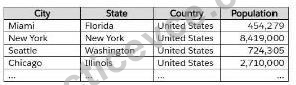
アナリストは、City ディメンションを使用して、人口が 100 万人を超える都市を表示する動的フィルターを作成する必要があります。
アナリストはどのタイプのフィルターを使用すべきでしょうか?
- A. 条件
- B. 範囲
- C. トップ
- D. スペシャル
Correct Answer: A 🗳️
ダッシュボードが空白です。
ダッシュボードに2つのシートを追加します。シートは表示/非表示ボタンをサポートしている必要があります。
どの 2 つのオブジェクトにシートを追加できますか? (回答領域で適切な 2 つのオプションをクリックします。)
Correct Answer:
To add two sheets to the dashboard that support the Show/Hide button, you can add them to either a horizontal or a vertical container. A container is an object that can hold one or more sheets or other objects and allow you to arrange them in a layout. A Show/Hide button is a feature that lets you hide or show a container and its contents on the dashboard. You can add a Show/Hide button to any container, whether it is tiled or floating, by using the drop-down menu of the container and selecting "Add Show/Hide Button." You can also customize the appearance and behavior of the button.
To add a horizontal or a vertical container to the dashboard, you can drag them from the Objects pane to the dashboard. A horizontal container will arrange the sheets or objects horizontally, while a vertical container will arrange them vertically. You can then drag the sheets you want to add from the Sheets pane to the container. You can resize and reorder the sheets or objects within the container by using the handles and arrows.
The other objects in the Answer Area, such as text, image, web page, blank, navigation, download, and extension, do not support the Show/Hide button. They are either static elements that cannot hold other objects, or dynamic elements that require user interaction or external sources. You can add them to the dashboard as well, but they will not have the same functionality as a container with a Show/Hide button.
References:
Add Show/Hide Buttons - Tableau
Layout Containers - Tableau
Viewing page 1 out of 36 pages.
Viewing questions 1-5 out of 178 questions.
 0 Customer Reviews
