

[2025] Pass CompTIA 220-1201 Exam Updated 210 Questions
Get 2025 Updated Free CompTIA 220-1201 Exam Questions and Answer
NEW QUESTION # 61
A technician is troubleshooting stylus issues on identical, company-provided tablets. Users can purchase their own accessories. Some users have no issues, but others report that their styluses charge intermittently and die frequently. Which of the following is the most likely cause of this issue?
- A. The malfunctioning styluses need firmware updates.
- B. The tablets need to be updated.
- C. Some of the tablets have manufacturing defects.
- D. Certain cases are causing charging issues.
Answer: D
Explanation:
The most likely cause isthird-party or ill-fitting casesobstructing the contact between the stylus and the tablet charging mechanism. Some cases may not be designed with stylus charging in mind, particularly if users are purchasing their own accessories.
Option B:A software update might fix OS-related issues, but would not typically affect physical charging.
Option C:If some devices had defects, the issue would likely be consistent, not isolated to some users.
Option D:Firmware issues could be a factor but are less likely than physical obstructions when users are using different accessories.
CompTIA A+ Core 1 Exam Objective Reference:
Objective 1.4: Given a scenario, configure settings and use cases for laptops and mobile devices.
NEW QUESTION # 62
Which of the following cable types can be used to transfer data and video?
- A. VGA
- B. DisplayPort
- C. HDMI
- D. USB-C
Answer: D
Explanation:
USB-Cis a versatile connector capable oftransmitting data, video, audio, and power. With standards likeDisplayPort over USB-C or Thunderbolt 3/4, it can be used for external displays, file transfers, charging, and more - all through one cable.
Option B (HDMI):Supports video and audio but not general data transfer.
Option C (DisplayPort):Similar to HDMI - supports video/audio but not general file transfer.
Option D (VGA):Legacy analog video only - no data or audio support.
CompTIA A+ Core 1 Exam Objective Reference:
Objective 3.1: Identify common connector types.
NEW QUESTION # 63
A salesperson is unable to use a personal device to access emails and calendar features at a client site but was able to use the device while at the office. Which of the following policies has been enforced on the salesperson's mobile device?
- A. MAM
- B. MOW
- C. MAN
- D. MFA
Answer: A
Explanation:
Mobile Application Management (MAM) enforces policies restricting access to apps and services based on location, ensuring security at external sites.
Why Not A (MOW): "Mobile Only Workplace" (MOW) is not a recognized term in this context.
Why Not B (MAN): Metropolitan Area Network (MAN) is unrelated to mobile device policies.
Why Not C (MFA): Multi-Factor Authentication secures user accounts but does not enforce app restrictions.
CompTIA A+ Exam Reference: Core 2 (220-1102), Section 2.7, mobile device security policies.
NEW QUESTION # 64
A small ISP has hired a new technician Joe, the new technician, is being trained to configure customers* home networks The trailing instructor gives me technician a starter kit with cables, cable ends, and other network equipment and asks mm to build a working network.
The computer should be connected to have internet connectivity and the phone should be connected to have a dial tone.
INSTRUCTIONS
Use the appropriate cables. cable ends, tools and equipment to configure the network ana connect an components accordingly There are 3 steps and the simulation starts on step 1.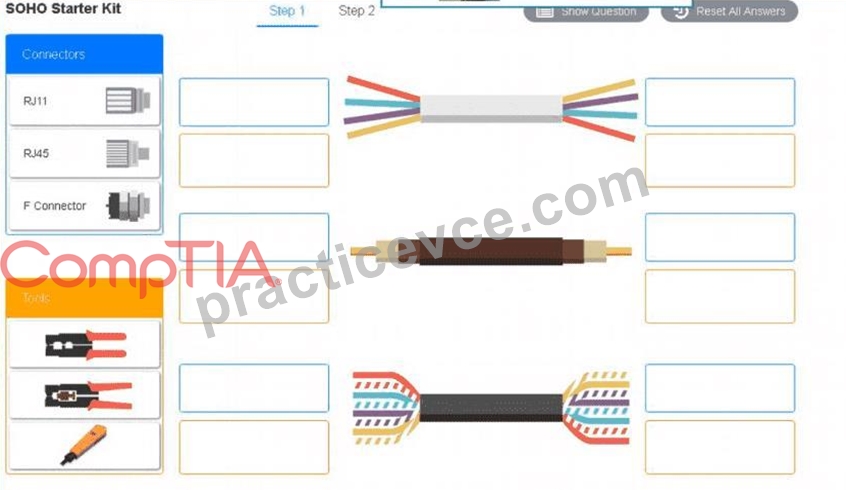
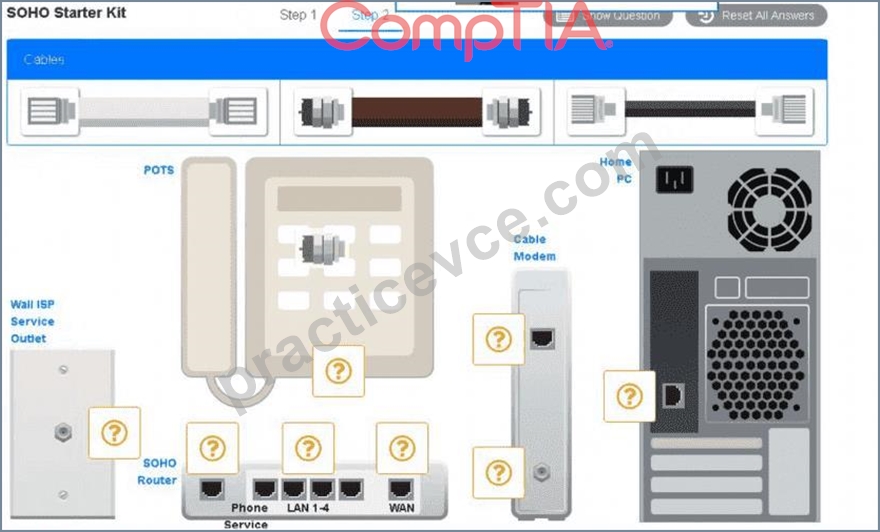
Answer:
Explanation:
See the answer below in explanation part.
Explanation:
Answer of both steps below.
A group of wires with different colors AI-generated content may be incorrect.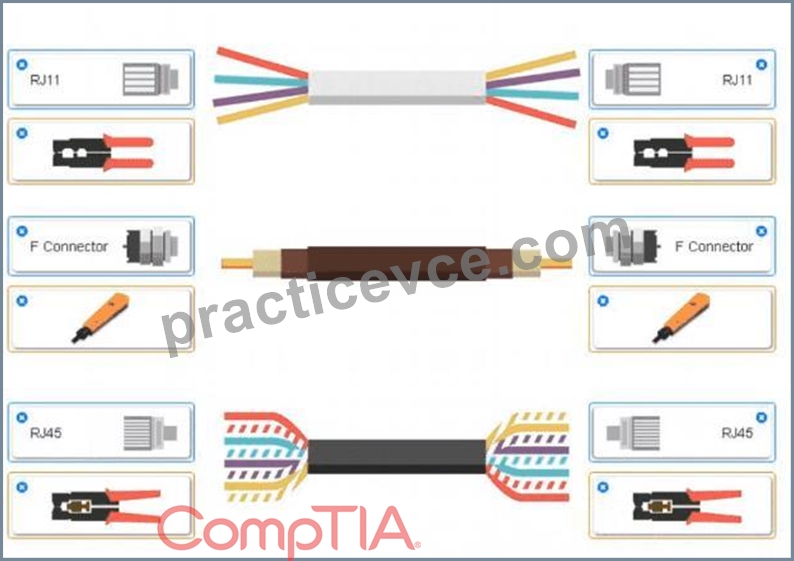
A screenshot of a computer AI-generated content may be incorrect.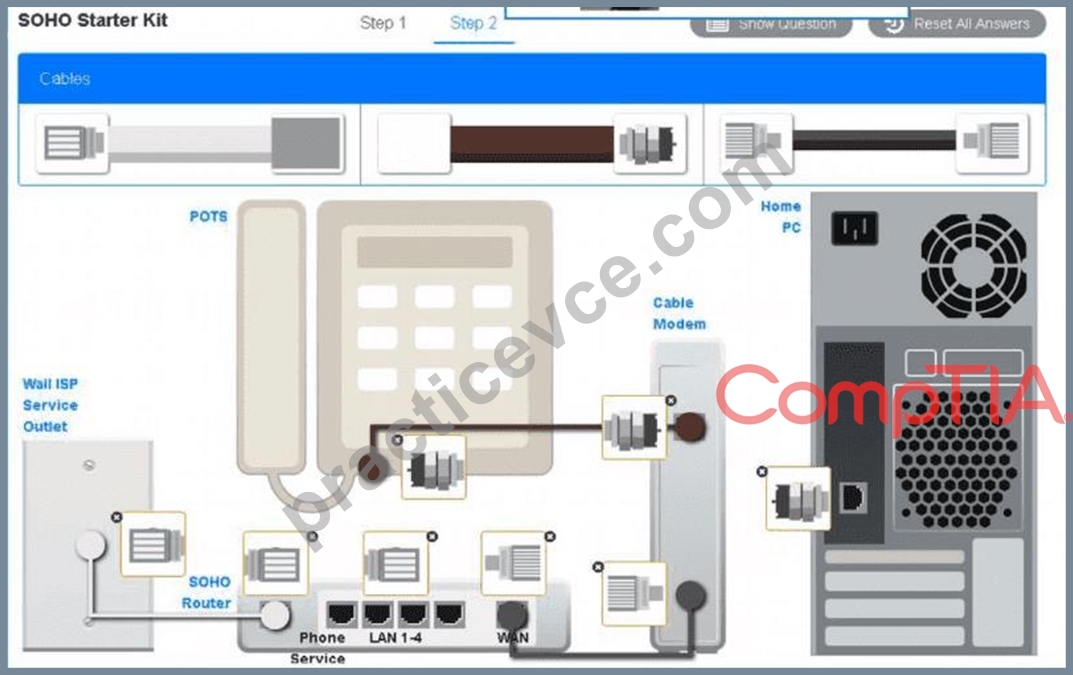
NEW QUESTION # 65
A technician receives a S.M.A.R.T. error on a PC. When the technician presses the Esc key, the PC continues to turn on without any further issues. Which of the following should the technician do next?
- A. Replace the HDD.
- B. Close the ticket.
- C. Update the PC's BIOS.
- D. Change the NIC.
Answer: A
Explanation:
Comprehensive and Detailed Step-by-Step Explanation:
S.M.A.R.T. (Self-Monitoring, Analysis, and Reporting Technology):
S.M.A.R.T. is a monitoring system integrated into modern HDDs and SSDs that detects and reports on various indicators of drive health and reliability.
A S.M.A.R.T. error indicates that the drive is showing signs of impending failure, even if the PC continues to boot and work normally for the time being.
Next Steps:
The appropriate action is to replace the hard drive (HDD) because a S.M.A.R.T. error is an early warning of possible hardware failure. Ignoring the warning could result in data loss if the drive fails completely.
The technician should also back up the user's data immediately to avoid losing critical information.
Incorrect Options:
B: Update the PC's BIOS: While keeping the BIOS updated is a good practice, it does not address the S.M.A.
R.T. error, which is specific to the HDD.
C: Close the ticket: Closing the ticket without resolving the issue would be improper, as the S.M.A.R.T. error is a hardware problem that needs to be addressed to prevent future data loss or downtime.
D: Change the NIC: The NIC (Network Interface Card) is unrelated to the storage system and would not resolve a S.M.A.R.T. error.
Key Takeaway:
A S.M.A.R.T. error is a critical indicator of HDD health issues, and the drive should be replaced as soon as possible. Backing up data is also essential.
Reference: CompTIA A+ Core 1 Exam Objectives (220-1201), Domain 5.1 - Troubleshooting hard drives and RAID arrays.
NEW QUESTION # 66
A management team is concerned about enterprise devices that do not have any controls in place. Which of the following should an administrator implement to address this concern?
- A. SSL
- B. vpn
- C. MFA
- D. MDM
Answer: D
Explanation:
Mobile Device Management (MDM) enables administrators to enforce controls on enterprise devices, such as restricting apps, ensuring compliance, and remotely managing security policies.
Why Not B (MFA): Multi-Factor Authentication secures user access but does not control device configurations.
Why Not C (VPN): VPN secures communication but does not enforce device controls.
Why Not D (SSL): SSL secures data in transit but does not provide device management.
CompTIA A+ Exam Reference: Core 2 (220-1102), Section 2.7, device management concepts.
NEW QUESTION # 67
A technician is troubleshooting a desktop PC that is plugged into a UPS. The PC loses the system date/time after every power outage. Which of the following should the technician do to resolve the issue? (Select two).
- A. Swap out the RAM.
- B. Disable NTP in the OS.
- C. Run a BIOS update.
- D. Install a surge protector.
- E. Replace the CMOS battery
- F. Repair the backup power source.
Answer: E,F
Explanation:
Comprehensive and Detailed Explanation From Exact Extract:
The system date/time is maintained by the CMOS battery when the PC is powered off. If this battery fails, time resets will occur. Additionally, since the system is connected to a UPS, ensuring the UPS is functioning correctly (i.e., the backup power source) is essential.
#Reference: "CompTIA A+ Complete Study Guide" by Quentin Docter - Chapter 1, page 40.
NEW QUESTION # 68
Which of the following networking devices will most likely need to be installed in between the ISP running DOCSIS and the LAN in a SOHO environment?
- A. Switch
- B. Firewall
- C. Router
- D. Cable modem
- E. Access point
Answer: D
Explanation:
Comprehensive and Detailed Step-by-Step Explanation:
To determine the correct device, we need to understand how a DOCSIS (Data Over Cable Service Interface Specification) network functions in a Small Office/Home Office (SOHO) environment:
C:Cable Modem:
A cable modem is required to convert the signal provided by the ISP (Internet Service Provider) over a DOCSIS network into a format that is usable by the local area network (LAN).
DOCSIS is a standard for high-speed internet over cable television infrastructure, and the cable modem acts as the gateway between the ISP's coaxial network and the LAN.
Without the cable modem, devices in the LAN would not be able to access the internet.
Reference: CompTIA A+ Core 1 Exam Objectives (220-1201), Domain 2.2 - Compare and contrast Internet connection types, network types, and their features.
Incorrect Options:
A:Switch:
A switch is used to connect multiple devices within the LAN. It does not connect the LAN to the ISP's DOCSIS network.
B:Firewall:
While firewalls provide security by managing inbound and outbound traffic, they do not serve as the interface between the ISP and LAN.
D:Router:
A router directs traffic between different networks (e.g., between a LAN and the internet). However, in a DOCSIS network, the cable modem is the device that first connects to the ISP. Many modern cable modems also include built-in routers, but the modem is the primary device needed.
E:Access Point:
An access point provides wireless connectivity within the LAN. It does not connect directly to the ISP or handle DOCSIS signals.
Key Takeaway:The correct device required to interface between the ISP's DOCSIS network and the SOHO LAN is the cable modem.
NEW QUESTION # 69
A projector has been shutting down after 30 minutes of use, and it has a strange smell The technician confirms the power source is not the cause of the issue Which of the following steps should the technician take next to resolve this issue?
- A. Replace the bulb
- B. Check the projector configuration.
- C. Adjust the gamma settings.
- D. Clean the filter
Answer: D
Explanation:
Reasoning: Projectors have air filters that prevent dust from entering the internal components. A clogged filter can cause the projector to overheat, resulting in shutdowns and even strange smells due to overheating components. Cleaning the filter is a standard troubleshooting step when projectors exhibit overheating symptoms.
Why the Other Options Are Incorrect:
A: Replace the bulb:
While a failing bulb may eventually cause issues, it would not typically result in a strange smell or repeated shutdowns after a fixed period. Bulb issues usually manifest as dim or flickering images.
B: Check the projector configuration:
Configuration settings, such as resolution or input options, would not cause overheating or shutdowns. This option does not address the described symptoms.
D: Adjust the gamma settings:
Gamma settings affect display brightness and contrast but have no impact on overheating or strange smells.
Practical Example:
Dust accumulation in projectors is a common issue, especially in environments with poor air circulation. A clogged filter causes restricted airflow, leading to overheating and automatic shutdowns to protect internal components. Cleaning the filter typically resolves this issue.
CompTIA A+ Exam Objective Alignment:
Objective 5.5: Troubleshoot common video, projector, and display issues.
NEW QUESTION # 70
A technician wants to upgrade a computer to a new Windows version. The Windows Upgrade Advisor states that the computer is not compatible with the new Windows version due to a lack of TPM 2.0 support. Which of the following should the technician do next?
- A. Enable the module in the UEFI BIOS.
- B. Implement BitLocker on the computer.
- C. Install an HSM in the computer.
- D. Perform a clean Install of the new Windows version.
Answer: A
Explanation:
TPM 2.0 (Trusted Platform Module) is often disabled by default in the UEFI BIOS. Enabling it is necessary to meet the requirements for certain Windows installations, including Windows 11.
Why Not B (Install an HSM): A Hardware Security Module (HSM) is a separate device used for cryptographic functions and is not related to TPM on the motherboard.
Why Not C (Perform a clean install): A clean installation will not bypass the TPM 2.0 requirement.
Why Not D (Implement BitLocker): BitLocker requires TPM but does not resolve its absence or lack of activation.
CompTIA A+ Exam Reference: Core 1 (220-1201), Section 3.4, BIOS/UEFI configuration.
NEW QUESTION # 71
Which of the following tools is best to track where an Ethernet cable is patched?
- A. Cable stripper
- B. Crimper
- C. Toner probe
- D. Punchdown tool
Answer: C
Explanation:
Comprehensive and Detailed In-Depth Explanation:
Atoner probe(also known as a tone generator and probe) is the best tool fortracing and identifying cablesin a patch panel or wall jack. The tone generator sends a signal through the wire, and the probe helps locate the cable by detecting the tone.
* Option A (Crimper):Used to attach connectors (e.g., RJ-45), not for tracing cables.
* Option B (Punchdown tool):Used to terminate cables into patch panels or keystone jacks.
* Option C (Cable stripper):Used to remove insulation, not to trace cables.
CompTIA A+ Core 1 Exam Objective Reference:
* Objective 5.1: Identify basic cable types, their connectors, and their features.
NEW QUESTION # 72
A technician needs to move a workstation to a different logical network segment. Which of the following technologies should the technician use?
- A. VPN
- B. DHCP
- C. DNS
- D. VLAN
Answer: D
Explanation:
Comprehensive and Detailed In-Depth Explanation:
AVLAN (Virtual LAN)is used to logically segment a network without requiring physical separation. It enables grouping devices based on function or department regardless of their physical location.
* Option A (DHCP):Assigns IP addresses dynamically but doesn't create network segments.
* Option C (DNS):Resolves domain names to IP addresses, not used for network segmentation.
* Option D (VPN):Provides secure remote access but does not relate to logical segmentation within a local network.
CompTIA A+ Core 1 Exam Objective Reference:
* Objective 2.3: Explain common logical networking concepts.
NEW QUESTION # 73
A technician is installing a wireless access point and is required to run all cabling and make patch cords if necessary.
INSTRUCTIONS
Part 1
For each cable type, click the (+) to select the appropriate connector and tool.
part 2
An access point was moved and no longer has connectivity. Connect the access point, patch panel, and switch by clicking the (+) to select the appropriate cable end for each corresponding location to create a link.
The link will be visible after making the second selection of each pair.
Cable ends may be used multiple times, and all placeholders will be filled.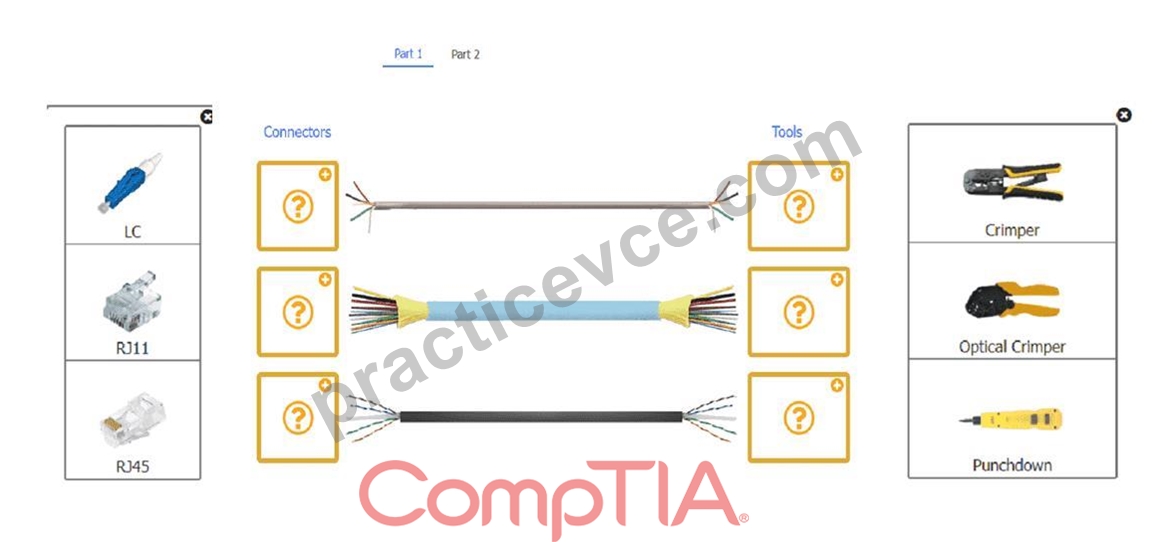
Answer:
Explanation:
See the solution below in Explanation.
Explanation:
Check the exhibit diagram for both parts.
A close-up of several cables AI-generated content may be incorrect.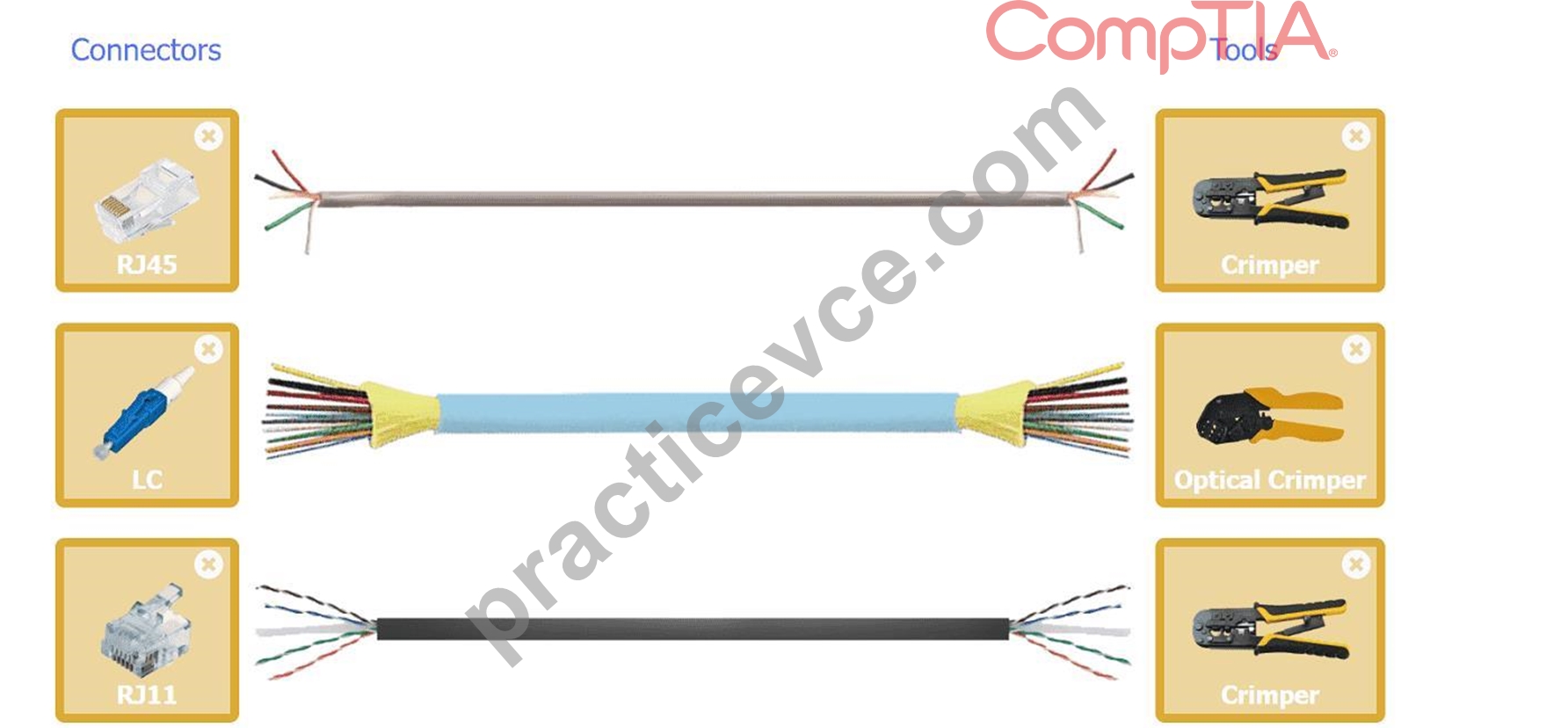
Part 2
A group of different colored rectangular objects AI-generated content may be incorrect.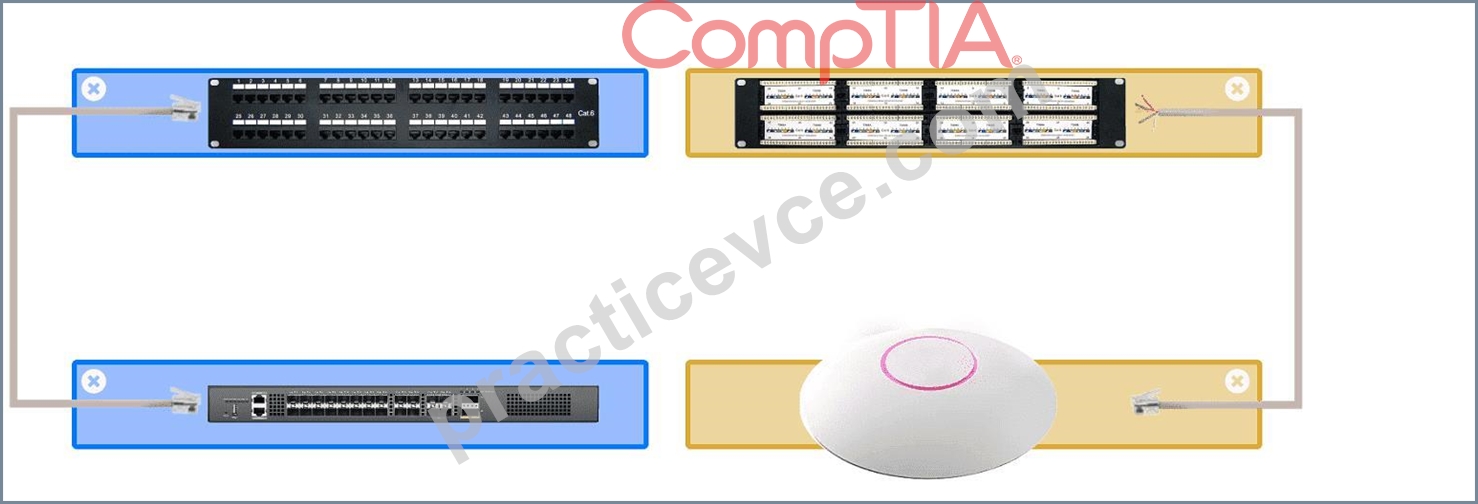
NEW QUESTION # 74
A user's wireless headset shows a "connected" status when turned on, but the Bluetooth list on the user's phone shows that the headset is "not connected." Which of the following should the technician do?
- A. Enable Bluetooth.
- B. Enter the PIN.
- C. Turn off Wi-Fi.
- D. Re-pair the devices.
Answer: D
Explanation:
When a device shows asnot connectedeven though it previously paired, the most effective action is tore-pair the devices. This resets the Bluetooth connection, clears any corruption in pairing profiles, and re-establishes communication.
Option A:Entering a PIN is only relevant during initial pairing and may not be prompted again.
Option B:Turning off Wi-Fi doesn't typically affect Bluetooth; they operate on similar frequencies but don't conflict this way in normal use.
Option D:If Bluetooth were disabled, the device wouldn't appear at all, not just show as "not connected." CompTIA A+ Core 1 Exam Objective Reference:
Objective 1.5: Given a scenario, connect and configure accessories and ports of mobile devices.
NEW QUESTION # 75
Which of the following ports should a technician disable to increase the security of remote connectivity?
- A. 0
- B. 1
- C. 2
- D. 3
Answer: B
Explanation:
Port 23 is used by Telnet, an unencrypted remote connection protocol that poses significant security risks.
Disabling Telnet and using secure alternatives like SSH (port 22) is best practice.
From CompTIA A+ 220-1101 Official Study Guide, Objective 2.1 - Common ports and protocols:
"Port 23 (Telnet) provides unencrypted remote access and should be disabled to increase security. Use SSH (port 22) for secure remote connections." Verified Source:
* CompTIA A+ Core 1 (220-1101) Official Study Guide, Chapter 2: Ports and Protocols
* CompTIA Exam Objectives 220-1101, Domain 2.1
NEW QUESTION # 76
......
Verified 220-1201 exam dumps Q&As with Correct 210 Questions and Answers: https://www.practicevce.com/CompTIA/220-1201-practice-exam-dumps.html
220-1201 Dumps PDF and Test Engine Exam Questions: https://drive.google.com/open?id=1v4I5qKyvntQSISnXpLXYEDdS0PUY3a4X