

[Sep-2026] 100-150 Questions - Truly Beneficial For Your Cisco Exam
Download Cisco 100-150 Sample Questions
NEW QUESTION # 22
Drag and Drop Question
Move the CIA security principles from the list on the left to its example on the right. You may use each security principle once, more than once, or not at all.
Note: You will receive partial credit for each correct selection.
Answer:
Explanation:
Explanation:
Encrypting a sensitive email protects the content from unauthorized disclosure, which supports confidentiality. A digital signature helps confirm the message has not been altered and supports trust in the data, which supports integrity. Configuring redundant web servers helps keep services accessible even during failures, which supports availability.
NEW QUESTION # 23
Which protocol does an IPv6 host use to resolve the MAC address associated with a destination IPv6 address?
- A. Cisco Discovery Protocol (CDP)
- B. Address Resolution Protocol (ARP)
- C. Dynamic Host Configuration Protocol (DHCP)
- D. Neighbor Discovery Protocol (NDP)
Answer: D
Explanation:
IPv6 uses Neighbor Discovery Protocol to discover the Layer 2 address of a destination on the local network. It replaces the ARP function used in IPv4 by using ICMPv6 messages to map an IPv6 address to a MAC address.
NEW QUESTION # 24
At which OSI layer is the data stream broken up into segments that include source and destination port numbers?
- A. Session
- B. Transport
- C. Data Link
- D. Network
Answer: B
Explanation:
The Transport layer breaks data into segments and adds source and destination port numbers so the receiving device can deliver the data to the correct application or service.
NEW QUESTION # 25
An engineer configured a new VLAN named VLAN2 for the Data Center team. When the team tries to ping addresses outside VLAN2 from a computer in VLAN2, they are unable to reach them.
What should the engineer configure?
- A. Static route
- B. Additional VLAN
- C. Default gateway
- D. Default route
Answer: C
Explanation:
When devices within a VLAN are unable to reach addresses outside their VLAN, it typically indicates that they do not have a configured path to external networks. The engineer should configure a default gateway for VLAN2. The default gateway is the IP address of the router's interface that is connected to the VLAN, which will route traffic from the VLAN to other networks12.
Reference: =
* Understanding and Configuring VLAN Routing and Bridging on a Router Using the IRB Feature
* VLAN 2 not able to ping gateway - Cisco Community
* VLANs: Virtual Local Area Networks (VLANs) logically segment network traffic to improve security and performance. Devices within the same VLAN can communicate directly.
* Default Gateway: For devices in VLAN2 to communicate with devices outside their VLAN, they need a default gateway configured. The default gateway is typically a router or Layer 3 switch that routes traffic between different VLANs and subnets.
* Additional VLAN: Not needed in this scenario as the issue is related to routing traffic outside VLAN2, not creating another VLAN.
* Default Route: While a default route on the router may be necessary, the primary issue for devices within VLAN2 is to have a configured default gateway.
* Static Route: This is used on routers to manually specify routes to specific networks but does not address the need for a default gateway on the client devices.
Reference:
* Cisco VLAN Configuration Guide: Cisco VLAN Configuration
* Understanding and Configuring VLANs: VLANs Guide
NEW QUESTION # 26
A help desk technician receives the four trouble tickets listed below.
Which ticket should receive the highest priority and be addressed first?
- A. Ticket 4: Two users report that wireless access in the cafeteria has been down for the last hour.
- B. Ticket 3: A user reports that response time for a cloud-based application is slower than usual.
- C. Ticket 1: A user requests relocation of a printer to a different network jack in the same office. The jack must be patched and made active.
- D. Ticket 2: An online webinar is taking place in the conference room. The video conferencing equipment lost internet access.
Answer: D
Explanation:
When prioritizing trouble tickets, the most critical issues affecting business operations or high-impact activities should be addressed first.
Here's a breakdown of the tickets:
Ticket 1: Relocation of a printer, while necessary, is not urgent and does not impact critical operations.
Ticket 2: An ongoing webinar losing internet access is critical, especially if the webinar is time-sensitive and involves multiple participants.
Ticket 3: Slower response time for a cloud-based application is important but typically not as urgent as a complete loss of internet access for a live event.
Ticket 4: Wireless access down in the cafeteria affects users but does not have the same immediate impact as a live webinar losing connectivity.
Thus, the correct answer is B. Ticket 2: An online webinar is taking place in the conference room. The video conferencing equipment lost internet access.
Reference: =
IT Help Desk Best Practices
Prioritizing IT Support Tickets
NEW QUESTION # 27
Hotspot Question
You purchase a new Cisco switch, turn it on, and connect to its console port. You then run the following command:
For each statement about the output, select True or False.
Note: You will receive partial credit for each correct selection.
Answer:
Explanation: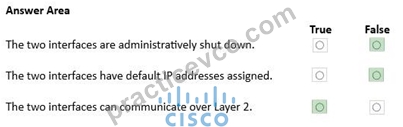
NEW QUESTION # 28
What is the correct IPv6 address format after compressing "2001:0db8:0000:0016:0000:001b:2000:0056"?
- A. 2001:db8::16::1b:2000:56
- B. 2001:db8:0:16:0:1b:2000:0056
- C. 2001:0db8::16:0:1b:2000:56
- D. 2001:db8:0:16::1b:2000:56
Answer: D
NEW QUESTION # 29
Which protocol allows you to securely upload files to another computer on the internet?
- A. SFTP
- B. HTTP
- C. NTP
- D. ICMP
Answer: A
Explanation:
SFTP, or Secure File Transfer Protocol, is a protocol that allows for secure file transfer capabilities between networked hosts. It is a secure extension of the File Transfer Protocol (FTP). SFTP encrypts both commands and data, preventing passwords and sensitive information from being transmitted openly over the network. It is typically used for secure file transfers over the internet and is built on the Secure Shell (SSH) protocol1.
References :=
*What Is SFTP? (Secure File Transfer Protocol)
*How to Use SFTP to Safely Transfer Files: A Step-by-Step Guide
*Secure File Transfers: Best Practices, Protocols And Tools
The Secure File Transfer Protocol (SFTP) is a secure version of the File Transfer Protocol (FTP) that uses SSH (Secure Shell) to encrypt all commands and data. This ensures that sensitive information, such as usernames, passwords, and files being transferred, are securely transmitted over the network.
*ICMP (Internet Control Message Protocol) is used for network diagnostics and is not designed for file transfer.
*NTP (Network Time Protocol) is used to synchronize clocks between computer systems and is not related to file transfer.
*HTTP (HyperText Transfer Protocol) is used for transmitting web pages over the internet and does not inherently provide secure file transfer capabilities.
Thus, the correct protocol that allows secure uploading of files to another computer on the internet is SFTP.
References :=
*Cisco Learning Network
*SFTP Overview (Cisco)
NEW QUESTION # 30
Drag and Drop Question
Move each network type from the list on the left to the correct example on the right.
Answer:
Explanation:
NEW QUESTION # 31
A user initiates a trouble ticket stating that an external web page is not loading. You determine that other resources both internal and external are still reachable.
Which command can you use to help locate where the issue is in the network path to the external web page?
- A. nslookup
- B. ping -t
- C. tracert
- D. ipconfig/all
Answer: C
Explanation:
The tracert command is used to determine the route taken by packets across an IP network. When a user reports that an external web page is not loading, while other resources are accessible, it suggests there might be an issue at a certain point in the network path to the specific web page. The tracert command helps to diagnose where the breakdown occurs by displaying a list of routers that the packets pass through on their way to the destination. It can identify the network segment where the packets stop progressing, which is valuable for pinpointing where the connectivity issue lies.
Reference: =
Cisco CCST Networking Certification FAQs - CISCONET Training Solutions, Command Prompt (CMD): 10 network-related commands you should know, Network Troubleshooting Commands Guide: Windows, Mac & Linux - Comparitech, How to Use the Traceroute and Ping Commands to Troubleshoot Network, Network Troubleshooting Techniques: Ping, Traceroute, PathPing.
* tracert Command: This command is used to determine the path packets take to reach a destination. It lists all the hops (routers) along the way and can help identify where the delay or
failure occurs.
* ping -t: This command sends continuous ping requests and is useful for determining if a host is reachable but does not provide path information.
* ipconfig /all: This command displays all current TCP/IP network configuration values and can be used to verify network settings but not to trace a network path.
* nslookup: This command queries the DNS to obtain domain name or IP address mapping, useful for DNS issues but not for tracing network paths.
Reference:
* Microsoft tracert Command: tracert Command Guide
* Troubleshooting Network Issues with tracert: Network Troubleshooting Guide
NEW QUESTION # 32
Hotspot Question
For each statement about bandwidth and throughput, select True or False.
Note: You will receive partial credit for each correct selection.
Answer:
Explanation:
Explanation:
Bandwidth is the network's capacity, while latency is the delay in transmission, so low bandwidth does not by itself increase latency. High latency does not change the actual bandwidth of a link, but it can reduce how efficiently data is delivered. Reducing latency can improve the rate of successful data delivery, which increases throughput.
NEW QUESTION # 33
Your company has 20 Cisco switches throughout its building.
You need to view the configuration of each switch from the command line.
Which protocol should you use?
- A. SMTP
- B. SNMP
- C. FTP
- D. RDP
Answer: B
Explanation:
SNMP is used to monitor and retrieve management information from network devices such as switches. It allows an administrator to view device configuration and status information remotely from the command line through a network management system or SNMP tools.
NEW QUESTION # 34
When setting up a wireless network, which security benefit is provided by enabling WPA3?
- A. Limits network access to only specified devices
- B. Sends traffic through an encrypted tunnel
- C. Makes it more difficult to discover the wireless network
- D. Secures authentication between client and access point
Answer: D
Explanation:
WPA3 strengthens the authentication process between the wireless client and the access point and improves protection for wireless sessions. Its main security benefit is more secure authentication when devices connect to the Wi-Fi network.
NEW QUESTION # 35
Which command will display all the current operational settings configured on a Cisco router?
- A. show version
- B. show startup-config
- C. show protocols
- D. show running-config
Answer: D
Explanation:
Router
The show running-config command is used on a Cisco router to display the current operational settings that are actively configured in the router's RAM. This command outputs all the configurations that are currently being executed by the router, which includes interface configurations, routing protocols, access lists, and other settings. Unlike show startup-config, which shows the saved configuration that the router will use on the next reboot, show running-config reflects the live, current configuration in use.
References := The information is supported by multiple sources that detail the use of Cisco commands, particularly the show running-config command as the standard for viewing the active configuration on a Cisco device123.
* show running-config: This command displays the current configuration running on the router. It includes all the operational settings and configurations applied to the router.
* show protocols: This command shows the status of configured protocols on the router but not the entire configuration.
* show startup-config: This command displays the configuration saved in NVRAM, which is used to initialize the router on startup, but not necessarily the current running configuration.
* show version: This command provides information about the router's software version, hardware components, and uptime but does not display the running configuration.
References:
* Cisco IOS Commands: Cisco IOS Commands
NEW QUESTION # 36
A user reports that a company website is not available. The help desk technician issues a tracertcommand to determine if the server hosting the website is reachable over the network.
The output of the command is shown as follows:
What can you tell from the command output?
- A. The server address 192.168.1.10is being blocked by a firewall on the router at hop 3.
- B. Requests to the web server at 192.168.1.10are being delayed and time out.
- C. The router at hop 3 is not forwarding packets to the IP address 192.168.1.10.
- D. The server with the address 192.168.1.10is reachable over the network.
Answer: D
Explanation:
Despite the timeout at hop 3, the trace reaches 192.168.1.10 at hop 5, indicating the server is reachable over the network.
NEW QUESTION # 37
Drag and Drop Question
Move each protocol from the list on the left to its correct example on the right.
Answer:
Explanation:
NEW QUESTION # 38
Which address is a link-local IPv6 address?
- A. fe80::261:2eff:fe10:7561
- B. fdf8:f535:82e4::53
- C. ff01:0:0:0:0:0:0:2
- D. 2001:db8:85a3:8d3:1319:8a2e:370:7348
Answer: A
Explanation:
Link-local IPv6 addresses use the prefix fe80::/10 and are automatically used for communication on the local link. The address shown begins with fe80, so it is a link-local address.
NEW QUESTION # 39
......
Cisco 100-150 Exam Syllabus Topics:
| Topic | Details |
|---|---|
| Topic 1 |
|
| Topic 2 |
|
| Topic 3 |
|
| Topic 4 |
|
Truly Beneficial For Your Cisco Exam: https://www.practicevce.com/Cisco/100-150-practice-exam-dumps.html
Real 100-150 Exam Questions and Answers FREE: https://drive.google.com/open?id=1R3CGPSpMjwV80Q7vMUFsml2l5FB-C11c