

Full MS-100 Practice Test and 304 unique questions with explanations waiting just for you!
Microsoft 365 Dumps MS-100 Exam for Full Questions - Exam Study Guide
NEW QUESTION 128
Your company has 20 employees, Each employees has a mailbox hosted in Outlook.com.
The company purchases a Microsoft 365 subcription.
You plan to migrate all the mailboxes to Microsoft 365.
You need to recommend which type of migration to use for the mailboxes.
What should recommend?
- A. IMAP migration
- B. Cutover migration
- C. Staged migration
- D. Minimal hybrid migration
Answer: A
Explanation:
Explanation
To migrate mailboxes from Outlook.com to Office 365, you need to use the IMAP migration method.
After you've added your users to Office 365, you can use Internet Message Access Protocol (IMAP) to migrate email for those users from their IMAP-enabled email servers.
In the Microsoft 365 admin center, go to to start migrating IMAP enabled emails.
The email migrations page is pre-configured for migrations from Gmail, Outlook, Hotmail and Yahoo. You can also enter your own IMAP server name and connection parameters to migrate from an email service that is not listed.
References:
https://docs.microsoft.com/en-us/exchange/mailbox-migration/migrating-imap-mailboxes/imap-migration-in-the
NEW QUESTION 129
Your company has an on-premises Microsoft Exchange Server 2016 organization and a Microsoft 365
Enterprise subscription.
You plan to migrate mailboxes and groups to Exchange Online.
You start a new migration batch.
Users report slow performance when they use the on-premises Exchange Server organization.
You discover that the migration is causing the slow performance.
You need to reduce the impact of the mailbox migration on the end-users.
What should you do?
- A. Configure back pressure.
- B. Modify the migration endpoint settings.
- C. Create a throttling policy.
- D. Create a mailbox rule.
Answer: B
Explanation:
Explanation/Reference:
Explanation:
You can reduce the maximum number of concurrent mailbox migrations.
NEW QUESTION 130
Note: This question is part of a series of questions that present the same scenario. Each question in the series contains a unique solution that might meet the stated goals. Some question sets might have more than one correct solution, while others might not have a correct solution.
After you answer a question in this section, you will NOT be able to return to it. As a result, these questions will not appear in the review screen.
Your network contains an Active Directory forest.
You deploy Microsoft 365.
You plan to implement directory synchronization.
You need to recommend a security solution for the synchronized identities. The solution must meet the following requirements:
* Users must be able to authenticate successfully to Microsoft 365 services if Active Directory becomes unavailable.
* User passwords must be 10 characters or more.
Solution: Implement password hash synchronization and configure password protection in the Azure AD tenant.
Does this meet the goal?
- A. No
- B. Yes
Answer: A
Explanation:
This solution meets the following requirement:
* Users must be able to authenticate successfully to Microsoft 365 services if Active Directory becomes unavailable. (this is because the authentication is performed by Azure Active Directory).
This solution does not meet the following requirement:
* Users passwords must be 10 characters or more.
To meet this requirement, you would need to configure the Default Domain Policy in the on-premise Active Directory.
Azure Password Protection can prevent users from using passwords from a 'banned password' list but it cannot be configured to require that passwords must be 10 characters or more.
Reference:
https://docs.microsoft.com/en-us/azure/active-directory/hybrid/how-to-connect-password-hash-synchronization
NEW QUESTION 131
You have a data loss prevention (DLP) policy.
You need to increase the likelihood that the DLP policy will apply to data that contains medical terms from the International Classification of Diseases (ICD-9-CM). The solution must minimize the number of false positives.
Which two settings should you modify? To answer, select the appropriate settings in the answer area.
NOTE: Each correct selection is worth one point.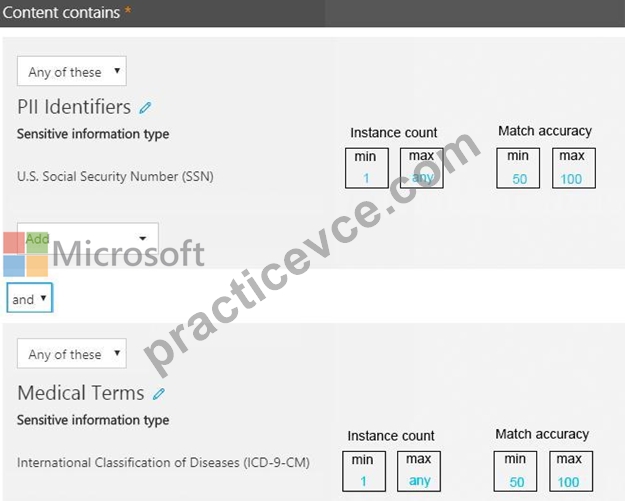
Answer:
Explanation:
Explanation
You can tune your rules by adjusting the instance count and match accuracy to make it harder or easier for content to match the rules. Each sensitive information type used in a rule has both an instance count and match accuracy.
To make the rule easier to match, decrease the min count and/or increase the max count. You can also set max to any by deleting the numerical value.
To minimize the number of false positives, we need to increase the minimum match accuracy.
A sensitive information type is defined and detected by using a combination of different types of evidence.
Commonly, a sensitive information type is defined by multiple such combinations, called patterns. A pattern that requires less evidence has a lower match accuracy (or confidence level), while a pattern that requires more evidence has a higher match accuracy (or confidence level).
Reference:
https://docs.microsoft.com/en-us/office365/securitycompliance/data-loss-prevention-policies
https://docs.microsoft.com/en-us/office365/securitycompliance/what-the-sensitive-information-types-look-for#in
NEW QUESTION 132
Note: This question is part of a series of questions that present the same scenario. Each question in the series contains a unique solution that might meet the stated goals. Some question sets might have more than one correct solution, while others might not have a correct After you answer a question in this section, you will NOT be able to return to it. As a result, these questions will not appear in the review screen.
You have a Microsoft 365 subscription.
You discover that some external users accessed content on a Microsoft SharePoint site. You modify the SharePoint sharing policy to prevent sharing outside your organization.
You need to be notified if the SharePoint policy is modified in the future.
Solution: From the SharePoint site, you create an alert.
Does this meet the goal?
- A. No
- B. Yes
Answer: A
Explanation:
Explanation
You need to create a threat management policy in the Security & Compliance admin center.
NEW QUESTION 133
Your network contains an on premises Active Directory domain named contoso.com. The domain contains five domain controllers.
Your company purchases Microsoft 365 and creates a Microsoft Azure Active Directory (Azure AD) tenant named contoso.onmicrosoft.com.
You plan to establish federation authentication between on premises Active Directory and the Azure AD tenant by using Active Directory Federation Services (AD FS).
You need to establish the federation.
What should you do? To answer, select the appropriate options in the answer area.
NOTE: Each correct selection is worth one point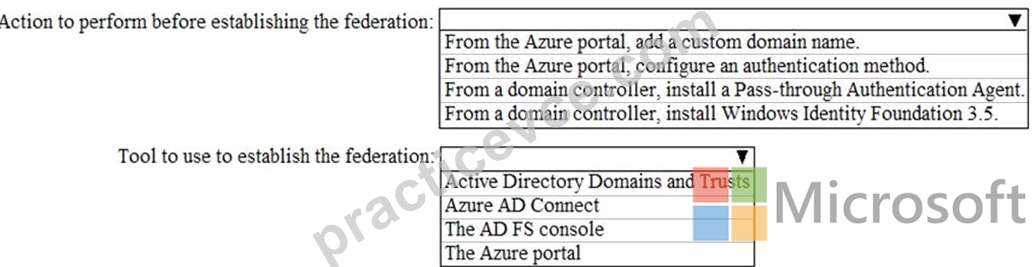
Answer:
Explanation:
Reference:
https://docs.microsoft.com/en-us/azure/active-directory/hybrid/how-to-connect-install-custom#configuring-federation-with-ad-fs
NEW QUESTION 134
Your network contains an on-premises Active Directory domain.
Your company has a security policy that prevents additional software from being installed on domain controllers.
You need to monitor a domain controller by using Microsoft Azure Advanced Threat Protection (ATP).
What should you do? More than once choice may achieve the goal. Select the BEST answer.
- A. Deploy an Azure ATP sensor, and then configure port mirroring.
- B. Deploy an Azure ATP standalone sensor, and then configure detections.
- C. Deploy an Azure ATP standalone sensor, and then configure port mirroring.
- D. Deploy an Azure ATP sensor, and then configure detections.
Answer: D
Explanation:
Explanation
If you're installing on a domain controller, you don't need a standalone ATP sensor. You need to configure the detections to detect application installations. With an ATP sensor (non-standalone), you don't need to configure port mirroring.
Reference:
https://docs.microsoft.com/en-us/azure-advanced-threat-protection/install-atp-step5
https://docs.microsoft.com/en-us/azure-advanced-threat-protection/atp-capacity-planning#choosing-the-right-sen
NEW QUESTION 135
You need to prepare the environment for Project1.
You create the Microsoft 365 tenant.
Which three actions should you perform in sequence next? To answer, move the appropriate actions from the list of actions to the answer area and arrange them in the correct order.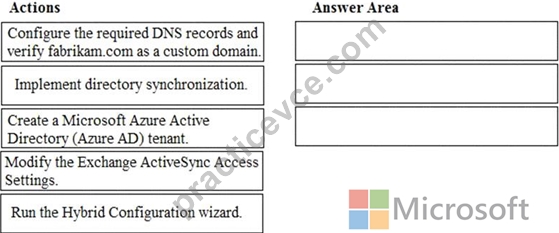
Answer:
Explanation:
Explanation
NEW QUESTION 136
You need to meet the application requirement for the Office 365 ProPlus applications.
You create a XML file that contains the following settings.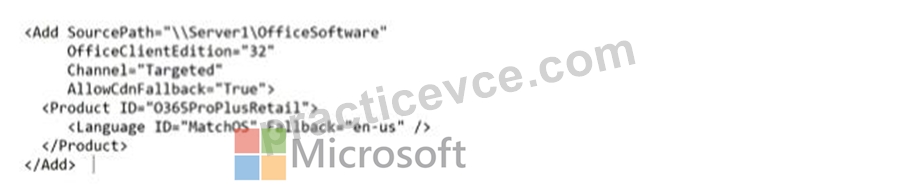
Use the drop-down menus to select the choice that complete each statement based on the information presented in the graphic.
NOTE: Each correct selection is worth one point.
Answer:
Explanation:
NEW QUESTION 137
Your company has 500 client computers that run Windows 10.
You plan to deploy Microsoft Office 365 ProPlus to all the computers.
You create the following XML file for the planned deployment.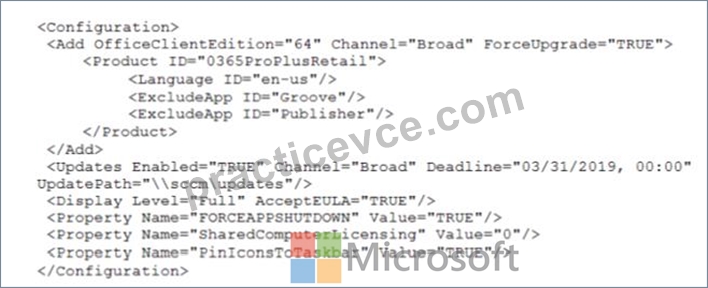
Use the drop-down menus to select the answer choice that completes each statement based on the information presented in the graphic.
NOTE: Each correct selection is worth one point.
Answer:
Explanation:
NEW QUESTION 138
Your network contains an on-premises Active Directory domain. The domain contains a server named Server1. Server1 has a share named Share1 that contains the files shown in the following table.
You have a hybrid deployment of Microsoft 365.
You create a Microsoft SharePoint site collection named Col lection1.
You plan to migrate Share1 to a document library in Collection1
You configure the SharePoint Migration Tool as shown in the exhibit. (Click the Exhibit tab.) For each of the following statements, select Yes if the statement is true. Otherwise, select No.
NOTE: Each correct selection is worth one point.

Answer:
Explanation:
Explanation:
Box 1: No
File1.txt will not be migrated as it was created before Jan 1 2019
Box 2: Yes
File2.txt will be migrated as it was created after Jan 1 2019 and was modified after Mar 1 2019.
Box 3: Yes
File permissions will be maintained after the migration.
References:
https://docs.microsoft.com/en-us/sharepointmigration/spmt-settings
NEW QUESTION 139
Please wait while the virtual machine loads. Once loaded, you may proceed to the lab section. This may take a few minutes, and the wait time will not be deducted from your overall test time.
When the Next button is available, click it to access the lab section. In this section, you will perform a set of tasks in a live environment. While most functionality will be available to you as it would be in a live environment, some functionality (e.g., copy and paste, ability to navigate to external websites) will not be possible by design.
Scoring is based on the outcome of performing the tasks stated in the lab. In other words, it doesn't matter how you accomplish the task, if you successfully perform it, you will earn credit for that task.
Labs are not timed separately, and this exam may have more than one lab that you must complete. You can use as much time as you would like to complete each lab. But, you should manage your time appropriately to ensure that you are able to complete the lab(s) and all other sections of the exam in the time provided.
Please note that once you submit your work by clicking the Next button within a lab, you will NOT be able to return to the lab.
You may now click next to proceed to the lab.
Lab information
Use the following login credentials as needed:
To enter your username, place your cursor in the Sign in box and click on the username below.
To enter your password, place your cursor in the Enter password box and click on the password below.
Microsoft 365 Username:
[email protected]
Microsoft 365 Password: 3&YWyjse-6-d
If the Microsoft 365 portal does not load successfully in the browser, press CTRL-K to reload the portal in a new browser tab.
The following information is for technical support purposes only:
Lab Instance: 10887751
You hire a new global administrator named Irvin Sayers to manage your Microsoft 365 tenant.
You need to modify Irvin Sayers to meet the following requirements:
Uses at least two methods of user authentication
Has the highest Microsoft Office 365 administrative privileges
Answer:
Explanation:
You need to assign the Global Admin role to Irvin Sayers. You then need to configure the account to require Multi-Factor Authentication (MFA).
1. In the Microsoft 365 admin center, select Users then select Active Users.
2. Select the Irvin Sayers account to open the account properties blade.
3. In the Roles section, click on the 'Manage roles' link.
4. Select the 'Admin center access' option.
5. Select Global Administrator then click the 'Save changes' button.
The next step is to enable the account for Multi-Factor Authentication (MFA).
1. If the Irvin Sayers account is selected in the user accounts list, deselect it (click on the tick icon next to the account name). Selecting a user account changes the menu options at the top of the page; deselecting the accounts changes the menu options back.
2. Click on the 'Multi-factor authentication' link at the top of the page.
3. In the 'Multi-factor authentication' page, select the Irvin Sayers account.
4. Click the 'Enable' link on the right side of the page.
5. In the pop-up window, click the 'enable multi-factor auth' button.
NEW QUESTION 140
You need to meet the application requirement for App1.
Which three actions should you perform? Each correct answer presents part of the solution.
NOTE: Each correct selection is worth one point.
- A. From the Microsoft 365 admin center, configure the Software download settings.
- B. On an on-premises server, download and install the Microsoft AAD Application Proxy connector.
- C. From the Azure Active Directory admin center, add an enterprise application.
- D. On an on-premises server, install the Hybrid Configuration wizard.
- E. From the Azure Active Directory admin center, configure the application URL settings.
Answer: B,C,E
Explanation:
Explanation
* An on-premises web application named App1 must allow users to complete their expense reports online.
Application Proxy is a feature of Azure AD that enables users to access on-premises web applications from a remote client. Application Proxy includes both the Application Proxy service which runs in the cloud, and the Application Proxy connector which runs on an on-premises server. Azure AD, the Application Proxy service, and the Application Proxy connector work together to securely pass the user sign-on token from Azure AD to the web application.
In this question, we need to add an enterprise application in Azure and configure a Microsoft AAD Application Proxy connector to connect to the on-premises web application (App1).
Reference:
https://docs.microsoft.com/en-us/azure/active-directory/manage-apps/application-proxy#how-application-proxy-
NEW QUESTION 141
You have a Microsoft 365 subscription.
You have the devices shown in the following table.
You need to onboard the devices to Windows Defender Advanced Threat Protection (ATP). The solution must avoid installing software on the devices whenever possible.
Which onboarding method should you use for each operating system? To answer, drag the appropriate methods to the correct operating systems. Each method may be used once, more than once, or not at all. You may need to drag the split bar between panes or scroll to view content.
NOTE: Each correct selection is worth one point.
Answer:
Explanation:
Explanation
References:
https://docs.microsoft.com/en-us/windows/security/threat-protection/windows-defender-atp/onboard-downlevel-
https://docs.microsoft.com/en-us/windows/security/threat-protection/windows-defender-atp/configure-endpoints-
https://docs.microsoft.com/en-us/windows/security/threat-protection/windows-defender-atp/configure-server-end
NEW QUESTION 142
You have a Microsoft Azure Active Directory (Azure AD) tenant named contoso.com that includes a user named User1.
You enable multi-factor authentication for contoso.com and configure the following two fraud alert settings:
Set Allow users to submit fraud alerts: On
Automatically block users who report fraud: On
You need to instruct the users in your organization to use the fraud reporting features correctly.
What should you tell the users to do? To answer, select the appropriate options in the answer area.
NOTE: Each correct selection is worth one point.
Answer:
Explanation:
Explanation:
References:
https://docs.microsoft.com/en-us/azure/active-directory/authentication/howto-mfa-mfasettings#fraud-alert
NEW QUESTION 143
You have a Microsoft 365 Enterprise subscription.
You create a password policy as shown in the following exhibit.
Use the drop-down menus to select the answer choice that completes each statement based on the information presented in the graphic.
NOTE: Each correct selection is worth one point.
Answer:
Explanation:
Explanation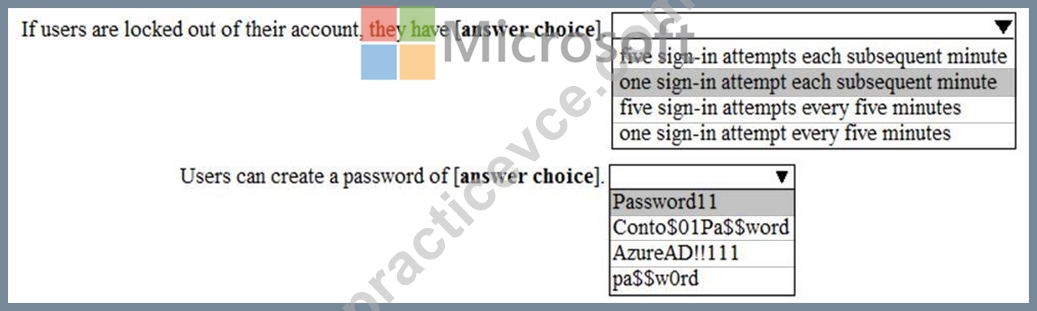
By default, smart lockout locks the account from sign-in attempts for one minute after 10 failed attempts. In this question, the lockout threshold if 5 failed attempts. The account locks again after each subsequent failed sign-in attempt, for one minute at first and longer in subsequent attempts.
Password evaluation goes through several steps including normalization and Substring matching which is used on the normalized password to check for the user's first and last name as well as the tenant name.
The next step is to identify all instances of banned passwords in the user's normalized new password. Then:
* Each banned password that is found in a user's password is given one point.
* Each remaining unique character is given one point.
* A password must be at least five (5) points for it to be accepted.
Conto$01Pa$$word contains two banned passwords and no remaining unique characters so is given a score of
2 points. This is less than the required 5 points so will be rejected.
Pa$$w0rd contains a banned password and no remaining unique characters so is given a score of 1 point. This is less than the required 5 points so will be rejected.
AzureAD!!111 contains a banned password (AzureAD!!) and has three remaining characters. However, the remaining characters are all the same (they're all 1s) so that is only one unique character. So that password will be given a score of 2. One for the banned password and 1 for the unique character. This is less than the required 5 points so will be rejected.
Password11 does not contain a banned password. Password11 contains 10 characters. However, there are two
's' and two '1' so there are 8 unique characters. Therefore, the password will be given a score of 8 points. This is more than the required 5 points so the password will be accepted.
Reference:
https://docs.microsoft.com/en-us/azure/active-directory/authentication/concept-password-ban-bad
https://docs.microsoft.com/en-us/azure/active-directory/authentication/howto-password-smart-lockout
NEW QUESTION 144
Note: This question is part of a series of questions that present the same scenario. Each question in the series contains a unique solution that might meet the stated goals. Some question sets might have more than one correct solution, while others might not have a correct solution.
After you answer a question in this section, you will NOT be able to return to it. As a result, these questions will not appear in the review screen.
Your company plans to deploy several Microsoft Office 365 services.
You need to design an authentication strategy for the planned deployment. The solution must meet the following requirements:
* Users must be able to authenticate during business hours only.
* Authentication requests must be processed successfully if a single server fails.
* When the password for an on-premises user account expires, the new password must be enforced the next time the user signs in.
* Users who connect to Office 365 services from domain-joined devices that are connected to the internal network must be signed in automatically.
Solution: You design an authentication strategy that uses password hash synchronization and seamless SSO.
The solution contains two servers that have an Authentication Agent installed.
Does this meet the goal?
- A. No
- B. Yes
Answer: A
Explanation:
Section: [none]
Explanation:
This solution meets the following requirements:
* Users who connect to Office 365 services from domain-joined devices that are connected to the internal network must be signed in automatically.
* Authentication requests must be processed successfully if a single server fails.
The following requirements are not met:
* Users must be able to authenticate during business hours only.
* When the password for an on-premises user account expires, the new password must be enforced the next time the user signs in.
To meet these two requirements, you would have to configure pass-through authentication.
Reference:
https://docs.microsoft.com/en-us/azure/security/azure-ad-choose-authn
NEW QUESTION 145
Your network contains two Active Directory forests. Each forest contains two domains.
You plan to configure Hybrid Azure AD join for the computers.
You create a Microsoft Azure Active Directory (Azure AD) tenant.
You need to ensure that the computers can discover the Azure AD tenant.
What should you create?
- A. a new service connection point (SCP) for each domain
- B. a new computer account for each computer
- C. a new service connection point (SCP) for each forest
- D. a new trust relationship for each forest
Answer: C
Explanation:
Your devices use a service connection point (SCP) object during the registration to discover Azure AD tenant information. In your on-premises Active Directory instance, the SCP object for the hybrid Azure AD joined devices must exist in the configuration naming context partition of the computer's forest. There is only one configuration naming context per forest. In a multi-forest Active Directory configuration, the service connection point must exist in all forests that contain domain-joined computers.
Reference:
https://docs.microsoft.com/en-us/azure/active-directory/devices/hybrid-azuread-join-manual
NEW QUESTION 146
Note: This question is part of a series of questions that present the same scenario. Each question in the series contains a unique solution that might meet the stated goals. Some question sets might have more than one correct solution, while others might not have a correct solution.
After you answer a question in this section, you will NOT be able to return to it. As a result, these questions will not appear in the review screen.
Your network contains an Active Directory domain.
You deploy a Microsoft Azure Active Directory (Azure AD) tenant.
Another administrator configures the domain to synchronize to Azure AD.
You discover that 10 user accounts in an organizational unit (OU) are NOT synchronized to Azure AD. All the other user accounts synchronized successfully.
You review Azure AD Connect Health and discover that all the user account synchronizations completed successfully.
You need to ensure that the 10 user accounts are synchronized to Azure AD.
Solution: From Azure AD Connect, you modify the Azure AD credentials.
Does this meet the goal?
- A. No
- B. Yes
Answer: A
Explanation:
The question states that "all the user account synchronizations completed successfully". Therefore, the Azure AD credentials are configured correctly in Azure AD Connect. It is likely that the 10 user accounts are being excluded from the synchronization cycle by a filtering rule.
Reference:
https://docs.microsoft.com/en-us/azure/active-directory/hybrid/how-to-connect-sync-configure-filtering
NEW QUESTION 147
Your company recently purchased a Microsoft 365 subscription.
You enable Microsft Azure Multi-Factor Authentication (MFA) for all 500 users in the Azure Active Directory (Azure tenant) You need to generate a report that lists all the users who Azure registeration process.
What is the best approach to achieve the goal? More than one answer choice achieve the goal. Select the Best answer.
- A. From Azure Cloud Shell, run the Get-AzureADUser cndlet.
- B. From the Azure Active Directory admin center, use the Risky sign-ins blade.
- C. From the Azure Active Directory admin center, use the Multi-factor Authentication - Server Status blade.
- D. From Azure Cloud Shell, run the Get-Msoluser cndlet.
Answer: D
NEW QUESTION 148
Your network contains an on-premises Active Directory domain named contoso.com. The domain contains
1,000 Windows 10 devices.
You perform a proof of concept (PoC) deployment of Windows Defender Advanced Threat Protection (ATP) for
10 test devices. During the onboarding process, you configure Windows Defender ATP-related data to be stored in the United States.
You plan to onboard all the devices to Windows Defender ATP data in Europe.
What should you do first?
- A. Onboard a new device
- B. Offboard the test devices
- C. Create a workspace
- D. Delete the workspace
Answer: B
Explanation:
When onboarding Windows Defender ATP for the first time, you can choose to store your data in Microsoft Azure datacenters in the European Union, the United Kingdom, or the United States. Once configured, you cannot change the location where your data is stored.
The only way to change the location is to offboard the test devices then onboard them again with the new location.
Reference:
https://docs.microsoft.com/en-us/windows/security/threat-protection/microsoft-defender-atp/data-storage- privacy#do-i-have-the-flexibility-to-select-where-to-store-my-data
NEW QUESTION 149
......
Authentic Best resources for MS-100 Online Practice Exam: https://www.practicevce.com/Microsoft/MS-100-practice-exam-dumps.html
Get the superior quality MS-100 Dumps Questions from PracticeVCE: https://drive.google.com/open?id=1bse6fOGft3Y-ha6YNL-9Axx_0HObKQIe